PerchBar
PerchBar gives a group of applications a single taskbar button — including the ones that are already running, however you started them.
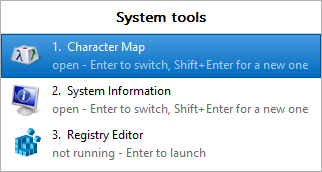
One button's worth of a group: the members that are running, and the ones that are not, in one list.
Pin one button for "my source control tools" or "my browsers". Click it to see every member of the group, running or not, and switch to one or start it. The windows of every member merge onto that one button, so the taskbar stays short.
What makes it different
Launchers can start applications into a group. PerchBar also takes an application you started some other way — from the Start menu, from a command prompt, by double-clicking a file — and moves its window onto the group's button. Nothing has to be launched through PerchBar for grouping to happen.
Where to go next
- Getting started — install, create a group, pin it.
- The Groups dialog — a tour of the one window that does everything.
- How grouping works — what PerchBar actually does to a window, and what that means.
PerchBar keeps no service and no driver. It is one executable, one INI file and a folder of shortcuts. Files and settings lists every location it touches.