Tray menu
Right-click PerchBar's notification-area icon.
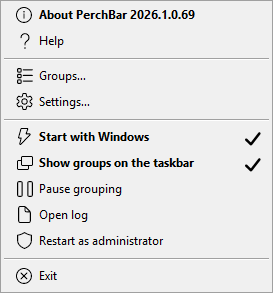
| About PerchBar 2026.1.0.69 | version and links. The item itself carries the full four-part version, so which build is running costs a glance rather than a dialog. Shown in bold because it is the menu's default item, so a plain left-click on the icon opens it. |
|---|---|
| Help | this help file. PerchBar looks for
PerchBar.chm beside itself. |
| Check for updates | asks PerchBar's website for the latest published release and answers in a balloon. Clicking a balloon that reports a newer version opens its download page. Nothing is ever downloaded or installed for you — see Checking for updates. |
| Groups… | the Groups dialog: everything about groups is in there. |
| Settings… | everything that is not about one group: Settings. |
| Show groups on the taskbar | ticked when the taskbar readout is shown. |
| Pause grouping / Resume grouping | a verb rather than a tick, so the item says which way it will go. Pausing leaves PerchBar running and every window it has already claimed alone; resuming catches up at once. While it is paused this item reads Resume grouping in bold, the tray icon is grey instead of blue, and the tooltip says so — a paused PerchBar otherwise looks exactly like a working one. The same switch is Group windows automatically on the Settings dialog's General page. |
| Start with Windows | ticked when PerchBar starts with your session. Grouping only happens while PerchBar is running. |
| Open log | opens the log file next to the executable. Present in the Debug and Release builds; the shipping build has no log. |
| Restart as administrator | shown while PerchBar is not elevated. Needed to group applications that are themselves elevated — see Limitations. |
| Running as administrator | the same line once PerchBar is elevated: greyed, because it is a statement rather than something to click. It is here because elevation is otherwise invisible — and because without it, choosing Restart as administrator makes the item you just clicked vanish, which reads as the command having gone missing rather than as having worked. |
| Exit | quits. Windows already claimed keep the group's button until they close — the identity is on the window, so it outlives PerchBar. To separate them first, use the Ungroup all windows hotkey. |
Two actions are not in this menu on purpose: Group running windows now and Ungroup all windows. Grouping happens as each window appears, with a sweep every few seconds behind it, so a manual "group now" is a button for something that has already happened — and beside it, "ungroup all" reads like the switch that governs grouping, which is what Pause grouping above actually is. Both remain available as hotkeys, on the Settings dialog's Hotkeys page.
About PerchBar
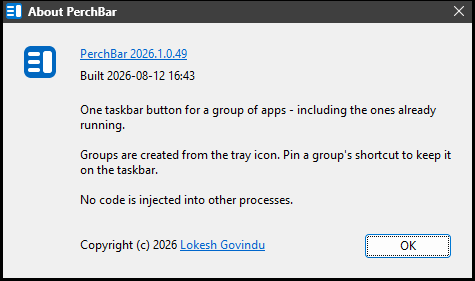
The version and build date to quote in a bug report, and what PerchBar does in three lines. The version itself is a link to the project. OK has the focus, so Enter closes it.
| Credits | who wrote PerchBar, the licence it is given under (freeware: free of charge, not open source), and what it is built with — which is nothing but Windows itself: no bundled library, and no third-party code in the executable. All three are compiled in, so this window works whatever else was unzipped beside it. |
|---|---|
| Copy details | puts the exact version, when that build was made, your Windows version and whether PerchBar is running elevated on the clipboard. That is what a bug report needs and the part nobody transcribes correctly; the button says Copied when it has. |
The tray icon comes in two versions, for light and dark taskbars, and PerchBar swaps them the moment you change theme.