Checking for updates
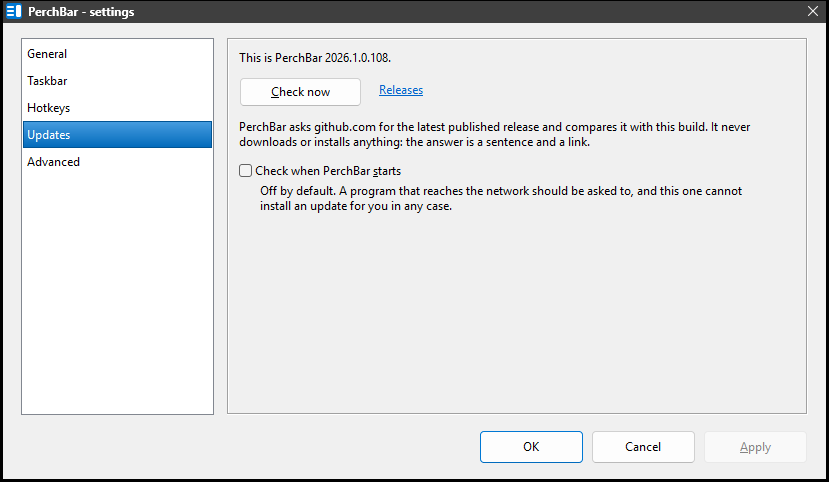
Settings → Updates: the status line, the button, and the link to the releases page.
Tray icon → Check for updates, or tray icon → Settings… → Updates → Check now.
The tray item answers in a balloon, which is the quick way to ask; the Settings page answers in a line of text beside the button, and is where the option below lives. Both ask exactly the same question.
Windows shows a balloon as a notification, and it will not show one at all while your session is locked or notifications are switched off. When you asked for the check, PerchBar says the same thing in a small dialog instead — a menu item that answers with nothing is worse than one that interrupts you.
PerchBar asks its website for the latest published release, compares its version with this build, and tells you which of the two is newer. If there is something newer, the link beside the button points at the download page.
It never installs anything
The answer is a sentence and a link, and that is deliberate. The executable is not code-signed,
so a program that quietly replaced itself would be teaching you to trust exactly the thing worth
being careful about. Downloading and replacing PerchBar.exe is yours to do, and it is
one file.
Check when PerchBar starts
Off by default. A program that reaches the network should be asked to first, and this one cannot install what it finds in any case.
Turned on, PerchBar asks once at startup and says nothing unless there is something newer. A balloon at every login reporting that nothing has changed is the kind of thing that gets an application switched off, so the quiet answer is no answer at all; the noisy one is a balloon naming the new version, and clicking it opens the download page.
Asking by hand is different on purpose: Check for updates and Check now always answer, because you asked.
What the answers mean
| This is the latest version | the published release is this version or older. |
|---|---|
| A newer version is available | with its version and a link to it. |
| No published release to compare against | either the project has published no releases, or it is private — both look identical to a request that carries no credentials, so PerchBar reports what it can actually tell you rather than guessing. |
| Could not reach the update manifest | no network, no name resolution, or a refused connection. The check gives up after five seconds rather than making you wait. |
Nothing is sent but the request itself. There is no identifier, no version report and no telemetry: PerchBar asks a public web address what its latest release is, exactly as a browser would.
See also: Settings.