Creating and deleting groups
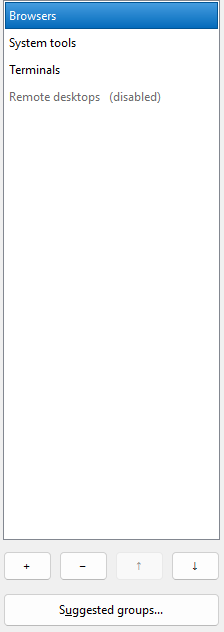
Your groups, in the order their buttons will sit. A group shown greyed with (disabled) beside it is still here and still yours; it is simply not claiming anything.
Creating
Choose + under the list — or press
Insert — type a name, and add applications. The group is real once
you choose Apply or OK; before that the list marks
it (new) and Open group and
Launch all are unavailable, because there is nothing stored for them to
act on yet.
Copying one
Right-click a group and choose Duplicate, or press
Ctrl+D. You get <name> (copy) immediately after it, with
the same applications, the same per-member settings and the same icon. Copy
and Paste on the same menu are the two-step version, for putting the copy
somewhere else in the list.
Two things are deliberately not copied: the group's hidden id, so the copy becomes a group of its own rather than overwriting the one it came from, and its hotkey, because no two groups can register the same combination.
Renaming
Edit Group name. Renaming is always safe: a group's identity is a hidden id allocated once, and the pinned button follows that id, not the name. When you apply, PerchBar rewrites the group's shortcuts so the taskbar shows the new name, and removes the ones under the old name.
A pinned shortcut keeps the name it was pinned under. That is Windows, not PerchBar: only you can rename or re-pin a pinned item. The button's label follows the group.
Deleting
Select the group and choose − under the list, or press Delete. Nothing is removed from disk until you apply, so Cancel brings the group back. When you do apply, the group's shortcuts go with it; a copy you had already pinned stays on the taskbar and stops working, so unpin it by hand.
Order
↑ and ↓ under the list, or Ctrl+Up and Ctrl+Down, reorder your groups. Each is unavailable when the selected group is already at that end.
The order is not cosmetic: group hotkeys are registered by position, so PerchBar re-registers them whenever groups are added, deleted or reordered. You will not notice that happening — but it is why the order is saved, and why reordering counts as a change you have to apply.