Keyboard and mouse
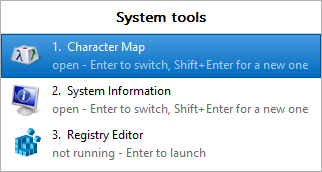
The numbers down the left are the keys: 1–9 pick
a member directly.
A group's pinned button
| Click | opens the group view — or opens the members ticked under Opens, if any are. |
|---|---|
| Middle click | the group view, whether or not a member is open. |
| Shift and click | the group view — but only while the group has no window open. After that Windows handles the click itself. |
| Right-click | the Jump List: every member, plus Show all members. |
The group view
| Up, Down | move through the members |
|---|---|
| Enter | switch to or start the selected member |
| Shift+Enter, or a middle-click | start another one, even if it is already open |
| Ctrl+Enter | start everything not running |
| 1–9 | go straight to that row; hold Shift for another one |
| Esc | close |
The members list in the Groups dialog
| Click a tick | toggles Opens or Any folder for that row |
|---|---|
| Double-click the name, or F2 | rename the member in place |
| Right-click a row | both settings, rename and remove, in one menu |
The Groups dialog
| Tab, Shift+Tab | move between controls |
|---|---|
| Alt and the underlined letter | the control with that letter |
| Enter | OK |
| Esc | Cancel, which discards everything since the dialog opened |
PerchBar 2026.1.0.112 — freeware: free of charge, not open source. Project on SourceForge · What it writes