Hotkeys
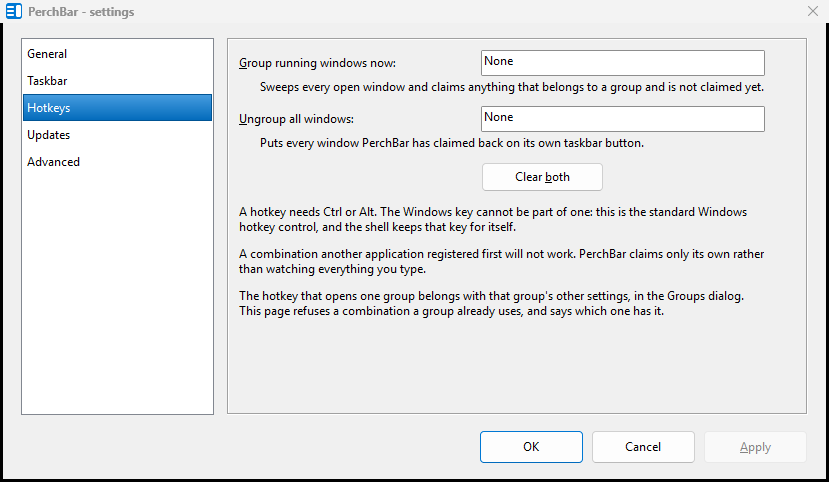
The global hotkeys, on the Settings dialog's Hotkeys page.
A hotkey for one group
Set it in the Groups dialog, in the Hotkey field, next to the rest of that group's settings. Clear removes it. A group's hotkey always shows the group view, even when the group's button is set to open its members directly.
The two global hotkeys
Tray icon → Settings… → Hotkeys:
| Group running windows now | sweeps every open window and claims anything that belongs to a group and is not claimed yet. |
|---|---|
| Ungroup all windows | puts every window PerchBar has claimed back on its own taskbar button. |
That page holds only the global pair. It still knows about your per-group hotkeys, though: it refuses a combination already in use and tells you which group has it.
Rules and limits
- The Windows key cannot be part of a PerchBar hotkey. The field is the standard Windows hotkey control, and the shell keeps the Windows key for itself.
- A combination another application registered first will not work. PerchBar claims only its own combinations rather than watching everything you type.
- A disabled group's hotkey is not registered, which frees the keys for something else.
Win+1, Win+2 and so on are Windows' own: they activate the first, second and further items on the taskbar. A pinned group responds to them like any other pinned item, without any hotkey of its own.
PerchBar 2026.1.0.112 — freeware: free of charge, not open source. Project on SourceForge · What it writes