PerchBar
One taskbar button for a group of applications — including the ones that are already running, however you started them.
Freeware, free for any use. Windows 11 and Windows 10, 64-bit. No installer: one executable.
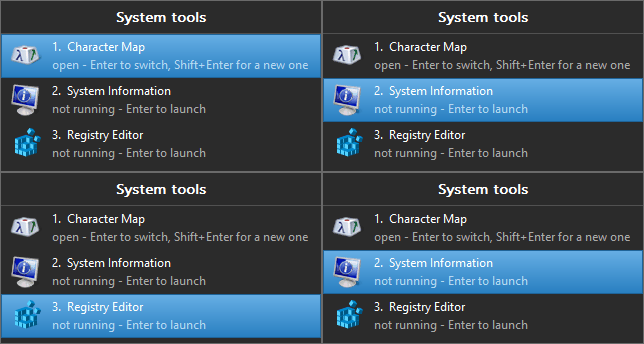
One button's worth of a group, and what using it looks like: the selection walks the list, one member is open and Enter switches to it, the other two are not and Enter starts them.
What makes it different
Launchers can start applications into a group. PerchBar also takes an application you started some other way — from the Start menu, from a command prompt, by double-clicking a file — and moves its window onto the group's button. Nothing has to be launched through PerchBar for grouping to happen, which is the whole reason it exists.
A group is one button
Pin one button for "my source control tools" or "my browsers". Click it to see every member, running or not, and switch to one or start it. Every member's windows merge onto that button, so the taskbar stays short.
It adopts what is already open
A window PerchBar has never seen is claimed within seconds of appearing, and a sweep catches the ones created hidden. An application that relabels its own window is corrected rather than lost.
Badges say what is inside
A small icon in the corner of the button names the program in use, so one button does not hide which of its members you are looking at. Per group, or globally.
Hotkeys and a keyboard-first view
A hotkey per group opens its view; 1–9 pick a member, arrows
move, Enter switches or launches. The view opens above the group's own button, where the
jump list appears.
A taskbar summary
An optional strip at the end of the taskbar says how many windows each group holds — readable without hovering anything.
It keeps to itself
No service, no driver, no network except an update check you ask for. One executable, one INI file and a folder of shortcuts, all under your own profile.
New here? Getting started installs it, creates a group and pins it. How grouping works explains what PerchBar actually does to a window, and what that means.